New Frontpage and Steam client integration via Buddy-App

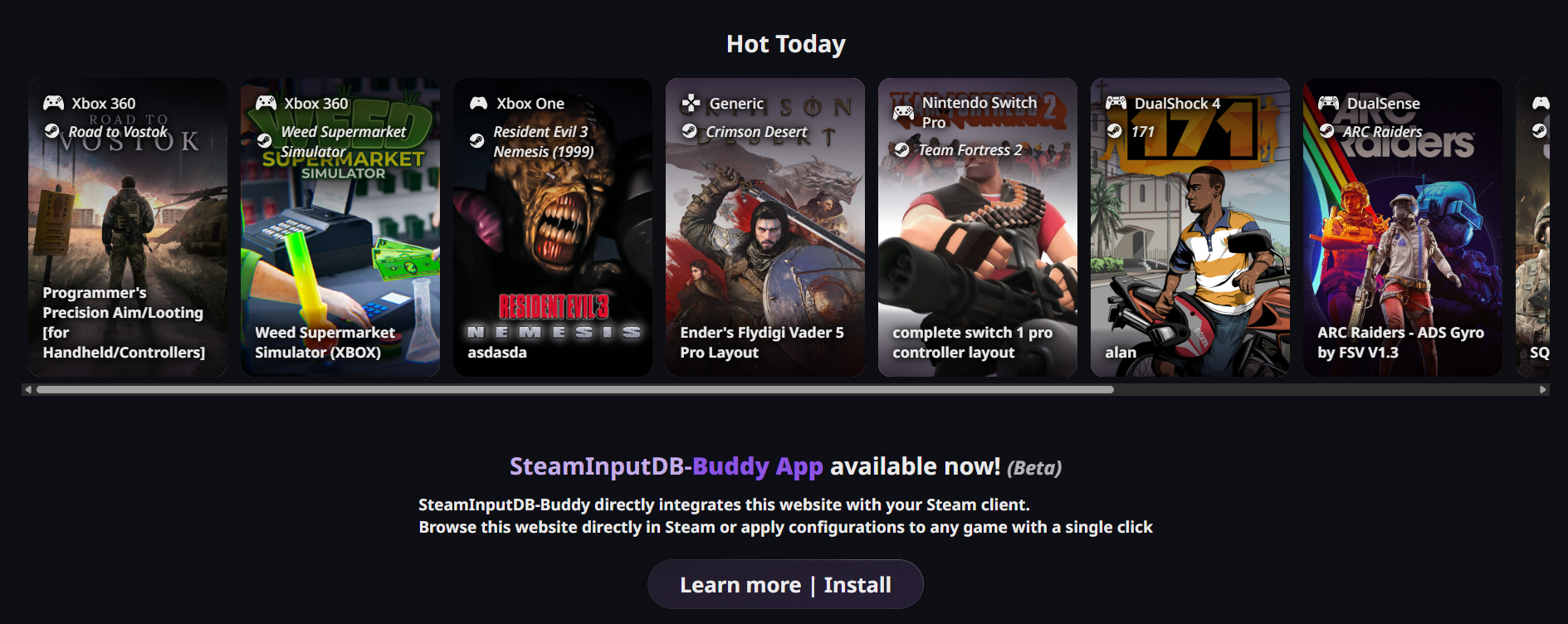
Along with displaying the trending configs on the frontpage SteamInputDB now provides direct integration on your Steam client via a buddy-app. Available for Linux and Windows. And yes, it works on the SteamDeck 😉
General site updates
Another month goes by, and another round of updates for SteamInputDB!
Along with a few minor tweaks to the theme, a much needed (but still not thorough enough) update to the FAQ, and some general polish all around.

I also finally got around to creating a proper Icon/Logo for the site.
It’s nothing fancy, but I feel it gives the site a bit more identity than a vectorized Steam Controller 2 asset from Valve…
You can find the source Illustrator file in SteamInputDB’s GitHub repository
Let me know what you think about it on reddit or on my Discord server!
The most immediately obvious change is, of course, the new frontpage.
Along with some updated texts, it now features a section showing the currently trending configs on Steam, as reported by the Steam Web API.
Do note that only Steam games are shown here, non-Steam shortcuts and special layouts like Desktop configs are filtered out.
The trending data is cached for about 6 hours to avoid extreme fluctuations.
But now to what I’m sure most of you are actually interested in:
Steam client integration via SteamInputDB-Buddy App
In the last news post about the Layout Preview, I teased that direct integration into Steam itself was on the roadmap.
Well, here it is.
SteamInputDB-Buddy is a fully optional companion app that can provide direct integration into the Steam client.
Using it, this website can talk to your Steam client and query your connected controllers, your library and it can even apply any Steam Input configuration to any game or non-Steam shortcut.
All directly from the website, without you ever having to download a .vdf-file or interact with Steams (very basic) Steam Input community features / UI.
None of this is ever transmitted to our server! All of your data stays local on your machine!
Current features
- Flexible “apply config” system
- Apply configurations to specific (connected) controllers
- Apply any configuration to any game, even across titles and non-Steam games.
Think: taking a config from Game [1] and applying it to Game [2], or to a non-Steam shortcut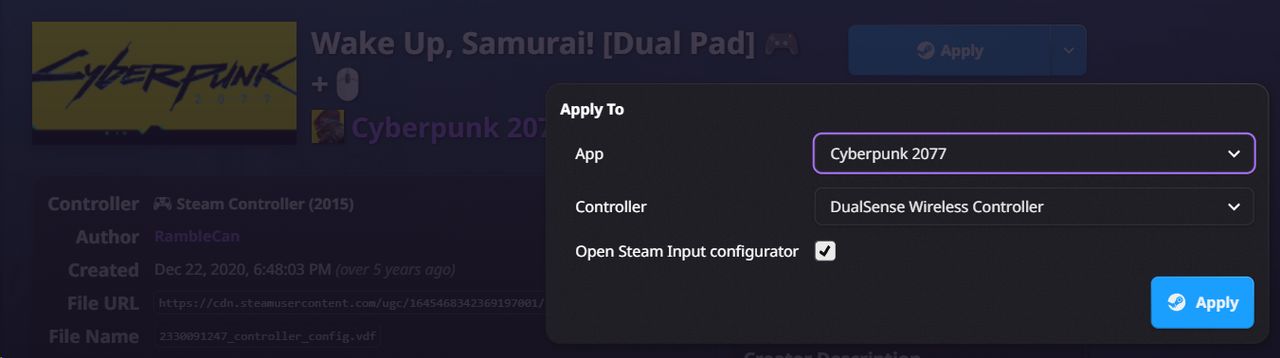
- Controller-aware filtering
Pre-filters configs to your actually connected controllers, removing UI clutter and complexity - Library buttons inside Steam for each game, so you can jump straight to available configs from your library
- Works in both Desktop and Big Picture mode
- Optionally uses Steams built-in browser, so you can stay in Steam while browsing configs

- And more to come! (soon™)


SteamInputDB-Buddy is available for both Windows and Linux and of course, it also works on the SteamDeck 😎
Download | Install SteamInputDB-BuddyPlease let me know any features you’d like to see or report any bugs you find on reddit, the GitHub repository or join the discussion on Discord
Do note that SteamInputDB is not yet gamepad navigable when using the site via the Buddy-App in Steam Big Picture mode (that includes the Steam Deck)
This is certainly something I want to add in the future, for now Deck users will just have to resort to the touch-screen or a connected mouse/keyboard when browsing configs on the Deck, sorry about that!
What’s next?
As outlined in the updated FAQ, I’d really like to add more community features to SteamInputDB Things like (but not limited to)
General controller compatibility ratings for games
- Does it support specific controllers well?
- Is Gyro supported? Natively?
- Mixed Input support?
Think of it as something similar to what ProtonDB does for Linux-gaming compatibility, but for controller support.
Comments and discussions on configs
User profile customization and preferences
- Link your socials / YouTube
- Showcases to feature your profiles
- Controller and Layout-feature preferences / prefiltering
And of course continued support of the brand new buddy-app and a lot of smaller tweaks and fixes here and there.
I’m not really sure of the order of or even when these features will be implemented, but your feedback will most likely have an impact.
Call to contributors
As all of this is a lot of work for one person that does all of this in their spare time,
I’m still looking for contributors to SteamInputDB, which is fully open source and available on GitHub.
If you have any experience with web-development (Go and Svelte especially) please reach out to me via Discord or look at the Issue board and start hacking!
Many Issues need refinement, though, so it might be a good idea to talk to me first, before your contribution drifts into the wrong direction.
If you aren’t a developer, feel free to contribute in any way you can! Whether that’s reporting bugs, suggesting features, or simply spreading the word!